
In the digital age, information has become the most valuable asset for content creators, digital professionals, and small and medium-sized businesses (SMEs). However, reliance on a single storage location—whether physical or cloud-based—exposes them to significant risks such as data loss, operational disruptions, and reputational damage. This report presents a comprehensive analysis of why a data backup strategy is a critical investment for business continuity, not just an emergency measure. It details the implementation of a hybrid backup plan, based on the robust and proven “3-2-1 Rule,” which combines the best of physical and digital storage. Finally, it assesses the role of content management platforms like GGyess, clarifying that while they are valuable workflow tools, they should not be confused with robust backup solutions. The goal is to provide clear and actionable guidance for comprehensively protecting digital assets.
1. Data Protection: A Critical Pillar for Productivity and Digital Survival
Data protection has evolved from a technical task to a strategic imperative. Information loss, whether due to system failures, accidental loss, or malicious attacks, can have catastrophic consequences that go far beyond simple file recovery.1Proactive planning for these scenarios is what separates a resilient company from one facing an existential crisis.
1.1. Hidden Risks and Not-So-Hidden Costs
Data loss may be total or partial in the event of unexpected events.1A disaster can take systems offline for hours, days, or even weeks.2Prolonged downtime generates direct financial costs and lost opportunities that can cripple an organization.2In addition to the economic impact, the brand’s reputation suffers damage that, in some cases, can be more difficult to recover than the data loss itself.2A company’s credibility is compromised if a customer is asked to provide a contract or personal information again, which can lead those customers to seek alternative providers with greater reliability guarantees.3
Data loss isn’t just a technological event; it’s the trigger for a cascading crisis. The initial incident, such as a virus attack that alters or deletes data, triggers downtime that leads to financial and reputational losses.1If the systems are not recoverable, the business could face ruin.2This chain of events underscores that backups are an investment in the operational resilience and public perception of a brand. Last but not least, the lack of adequate data backup can lead to serious legal issues. Various regulations, such as the General Data Protection Regulation (GDPR), require the protection and retention of sensitive data.2Failure to comply with these obligations can result in fines and financial penalties, demonstrating that a backup plan is not an option, but a legal obligation in many sectors.
1.2. From Data Recovery to Business Continuity
A well-designed backup plan is much more than an insurance policy. Its main purpose is to protect information and ensure its availability in the event of failure, loss, or theft.1It allows systems and applications to be restored to a previous state, a capability that translates into uninterrupted service or a basic level of service during a disaster.2Maintaining operational continuity, even at a minimal level, helps preserve customer trust, which strengthens brand loyalty.2
A comprehensive backup plan is a proactive tool. Rather than simply restoring lost data, it allows organizations to maintain services and credibility. The ability to restore a point-in-time snapshot of the system is a secondary but invaluable benefit, allowing them to undo unwanted changes or human errors that might have initially gone unnoticed.2This expands the usefulness of a backup from a simple copy to a version control and change management tool. Additionally, virtual systems can be loaded with backup data to operate online while real systems are being repaired.2This capability demonstrates that a backup plan encompasses not just files, but the entire operational infrastructure, providing true operational resilience that allows critical operations to continue.
2. Fundamentals of a Robust Backup Strategy: The 3-2-1 Rule
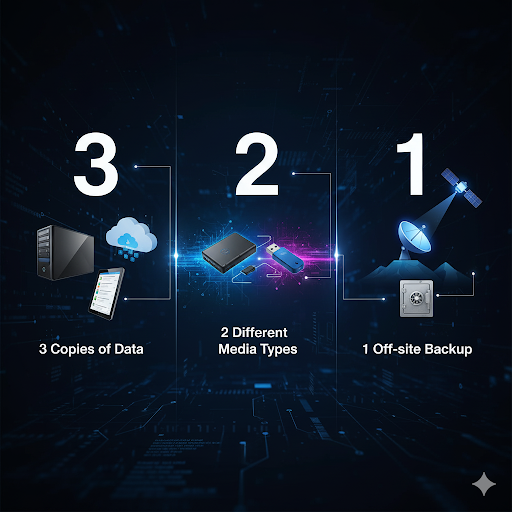
To build a backup strategy that withstands a wide range of threats, the data protection industry has adopted a framework known as the “3-2-1 Rule.”1This simple yet powerful method sets a standard for intelligently diversifying and redundating critical data.
2.1. The 3-2-1 Ecosystem
The 3-2-1 rule stipulates that an organization must have at least:
- Three copies of your data:the original data and two independent backup copies.2
- Two different types of storage media:for example, one copy on a local hard drive and another in the cloud.1
- A copy stored in an external (offsite) location:which protects information from local physical disasters.1
The importance of this strategy lies in the diversification of redundancy. The requirement for two different types of media prevents a “single point of failure.”1For example, a power surge could damage all connected devices of the same type in a location, wiping out all backups. By using different types of media (such as a physical disk and a cloud backup), the risk is minimized. The off-site backup, meanwhile, is the crucial component for protecting information against regional disasters, such as a fire or flood, which could destroy all devices in a single location.5The cloud is an ideal solution for this offsite backup, as it offers geographic redundancy and easy access in case of emergency.1
2.2. Key Definitions: RPO and RTO
Before implementing a backup strategy, it is essential to define two critical metrics that will determine the frequency and speed of the plan:
- RPO (Recovery Point Objective):This refers to the maximum amount of data a company is willing to lose. In other words, it defines the time that can elapse between the last backup and data loss.6A shorter RPO, for example, one hour instead of one day, means less data will be lost, reducing the impact on productivity.6
- RTO (Recovery Time Objective):It is the time required to fully restore operation after an incident.6A short RTO is essential for critical operations that cannot afford extended downtime.
RPO and RTO are the conceptual pillars for decision-making. A content creator who generates large volumes of video daily will need a very short RPO, opting for incremental or differential daily backups.6On the other hand, an SMB that generates less critical data might be happy with a longer RPO. The RTO, in turn, will dictate whether a fast, local backup is prioritized over a cloud backup, which might be slower to restore. These concepts allow the backup plan to be customized to fit the criticality of the data and the specific needs of the business.5
Learn to create a brand that leaves a mark Get the ebook now
3. The Dynamic Duo: Physical and Digital Backups
A hybrid backup strategy relies on a smart combination of physical and digital storage. Each of these methods has advantages and disadvantages that, when combined, create a much more resilient solution than if used separately.
3.1. Physical Storage: Control in Your Hands
Physical backups, such as those made to external hard drives (HDDs) and solid-state drives (SSDs), offer direct control over data and immediate access. They are a cost-effective and efficient option for storing large volumes of data.1However, there are crucial differences between the various types of devices.
- Hard Drives (HDD):They use mechanical parts (rotating discs and actuators) that are vulnerable to damage from drops, bumps, or long-term continuous use.8For this reason, their portability, often considered an advantage, is actually one of their biggest drawbacks. Despite this, HDDs are significantly cheaper than SSDs and offer high-capacity models (10 TB or more) that are easier to find on the market.8
- Solid State Drives (SSD):They have no moving parts, making them more durable and resistant to physical damage.8Plus, they’re considerably faster at transferring data, with speeds that can triple those of a basic HDD.8SSDs are also lighter and consume less power, extending the battery life of devices like laptops.8
The choice between HDD and SSD involves a trade-off between cost and reliability. A creator on a budget might choose a high-capacity HDD for their first local backup, but they should be aware of its fragility and complement it with a more robust cloud backup to mitigate risk. On the other hand, a professional who values speed and durability might justify the extra expense of an SSD.
Below is a table summarizing the main features of both physical storage devices:
| Feature | Hard Disk Drive (HDD) | Solid State Drive (SSD) |
| Read/Write Speed | Up to 160 MB/s8 | Up to 7,000 MB/s (NVMe)8 |
| Durability | Vulnerable to knocks and falls8 | More resistant to physical damage8 |
| Cost per Terabyte | More economical8 | More expensive8 |
| Maximum Capacity | Easier to find high-capacity models (e.g. 10 TB)8 | More limited capacity and more expensive models8 |
| Energy Consumption | Higher consumption; drains the battery faster8 | Lower power consumption; ideal for laptops8 |
| Noise Level | May be noisy due to mechanical parts8 | Silent as it has no moving parts8 |
3.2. Digital Cloud Storage: Scalability and Accessibility

Cloud storage, such as Google Drive or Dropbox, allows users to access their data from anywhere and on any device with an internet connection.9This method is the ideal solution for off-site backup (the “1” in the 3-2-1 rule), as it provides inherent protection against local disasters.5
A crucial distinction to make is between thebackupand thesynchronizationof data.11Syncing, where files are automatically updated on all connected devices, can be risky. If a file is deleted from one device, it’s deleted from all other connected devices.11A backup service, on the other hand, creates an additional, independent version in case the original is lost.11Platforms like Dropbox offer the ability to restore previous versions of files, mitigating the risk of overwriting.11
Cloud solutions offer advantages such as geographic redundancy, scalability, and remote accessibility, which is vital for distributed teams.12The ability to restore previous versions of data is a secondary but valuable benefit, allowing you to undo unwanted changes to your system.2When choosing a cloud provider, it’s essential to consider whether it offers end-to-end encryption, a critical factor for data security and privacy.2
4. Hybrid Strategy: The Fusion of Resilience and Flexibility
A hybrid backup strategy combines the best of both worlds: the immediacy and control of local storage with the scalability and external protection of cloud storage.12This methodology is considered the most comprehensive and superior option for most professionals and companies.
4.1. Why the Hybrid Strategy is the Superior Option
Hybrid backup provides redundancy by storing data in both on-premises and cloud environments, ensuring availability and recovery in the event of hardware failures or local disasters.12Local recovery is faster for day-to-day operations, while cloud backup provides critical redundancy for major failures.12
This strategy isn’t about having more backups, but rather about being smarter about resource allocation. It allows for cost optimization by using local infrastructure for routine backups (faster and cheaper) and the cloud for additional capacity during peak demand or as a long-term backup.12The hybrid strategy also facilitates flexible workload management, enabling seamless data movement between on-premises and cloud environments for collaboration with remote teams or data migration.12
4.2. Detailed Steps to Implement a Hybrid Backup Plan
Implementing a hybrid backup strategy requires methodical planning and a commitment to ongoing testing.
- Identify Critical Data:The first step is to thoroughly review the data to determine which data is most important to the business.5This includes financial records, customer data, and intellectual property.
- Classify and Prioritize:Data should be classified according to criticality levels (critical, important, optional). The frequency of backups will depend on this classification. For example, critical data might require daily backups, while less important data might require weekly or monthly backups.6
- Define RPO and RTO:It’s crucial to establish an RPO and RTO that fit your business needs. For highly critical data, incremental or differential backups can be scheduled daily, while a full backup can be performed weekly or monthly to ensure a more complete restore point.6
- Diversify the Media:The plan should adhere to the 3-2-1 rule. This could involve using a physical external hard drive as the first local backup and a cloud storage service for the offsite backup, thus protecting against hardware failures and local disasters.5
- Automate and Verify:Automating backups and reporting is essential to ensure they are performed correctly. Quarterly restoration tests should be scheduled to validate that data can be recovered without errors.6A backup that can’t be restored is worthless. This constant validation is what transforms a backup plan from a leap of faith into a certainty.
Finally, it’s crucial to document the backup policy and communicate it to the entire team.6Technology alone is not enough if the human factor is not engaged.
Sources cited
- The importance of backing up data – Universidad Piloto de Colombia, accessed: August 28, 2025,https://www.unipiloto.edu.co/la-importancia-de-respaldar-los-datos/
- What is Data Backup? – AWS, accessed August 28, 2025https://aws.amazon.com/es/what-is/data-backup/
- Lack of backup: the risks of not backing up | Arsys Blog, accessed August 28, 2025https://www.arsys.es/blog/riesgos-no-hacer-backup
- The 3-2-1 Backup Rule Explained – NinjaOne, accessed August 28, 2025,https://www.ninjaone.com/es/blog/3-2-1-respaldo-de-seguridad-explicado/
- 3-2-1 Backup Strategy: Steps to Implementation – Serverion, accessed August 28, 2025,https://www.serverion.com/es/3cx-hosting-pbx/3-2-1-backup-strategy-steps-for-implementation/
- Step-by-Step Backup Strategy for SMEs – LABELTEC, accessed August 28, 2025,https://labeltec.es/blog/estrategia-backup-pyme-paso-a-paso/
- Security Risks Associated with Tape Storage – Ontrack Data Recovery, accessed August 28, 2025,https://www.ontrack.com/es-es/blog/riesgos-de-seguridad-asociados-con-el-almacenamiento-en-cinta
- HDD vs. SSD externo – Kingston Technology, acceso: agosto 28, 2025, https://www.kingston.com/es/blog/pc-performance/hdd-vs-external-ssd
- Do you know all the data storage systems? – Ambit Iberia, accessed: August 28, 2025,https://www.ambit-iberia.com/blog/conoces-todos-los-sistemas-de-almacenamiento-de-datos
- Best Cloud Storage for Videos in 2024 – MASV, accessed August 28, 2025,https://massive.io/es/guias-de-herramientas/el-mejor-almacenamiento-en-la-nube-para-videos/
- What are the differences between backup and sync? – Dropbox.com, accessed August 28, 2025https://www.dropbox.com/es/resources/difference-between-backup-and-sync
- Setting Up Hybrid Cloud Backup: A Complete Guide – NAKIVO, accessed August 28, 2025,https://www.nakivo.com/es/blog/hybrid-cloud-backup-implementation-setup/
- Top 15 Cloud Storage Providers: Personal & Business Projects (Free & Paid) – Hostinger, Accessed August 28, 2025https://www.hostinger.com/es/tutoriales/proveedores-almacenamiento-en-la-nube
- Maximizing Hybrid Cloud Efficiency with Hybrid Backup – Spindatos, accessed August 28, 2025https://spindatos.com/maximizando-la-eficiencia-de-la-nube-hibrida-con-backup-hibrido/
- GGyess Social Suite – Apps on Google Play, accessed: August 28, 2025,https://play.google.com/store/apps/details?id=com.gloadi.ggyess.socialsuite2&hl=es
- GGyess Social Suite – Apps on Google Play, acceso: agosto 28, 2025, https://play.google.com/store/apps/details?id=com.gloadi.ggyess.socialsuite2
- Privacy Policy | GRAYESS Inc., acceso: agosto 28, 2025, https://www.web.grayess.com/privacy-policy