Monday, 9:00 AM. Your agency’s new and ambitious project has just been greenlit. As a diligent leader, you decide that this time everything will be different. This time there will be absolute order.
You open your favorite diagram software or an endless spreadsheet and spend three days building the masterpiece of project management: a spectacular Gantt Chart. Every task has a perfectly colored block. Dependency lines cross elegantly. Milestones shine with millimetric precision. You present it to your team and the client on a video call—everyone applauds the organization and nods in agreement.
Fast forward to Week 3 of the project.
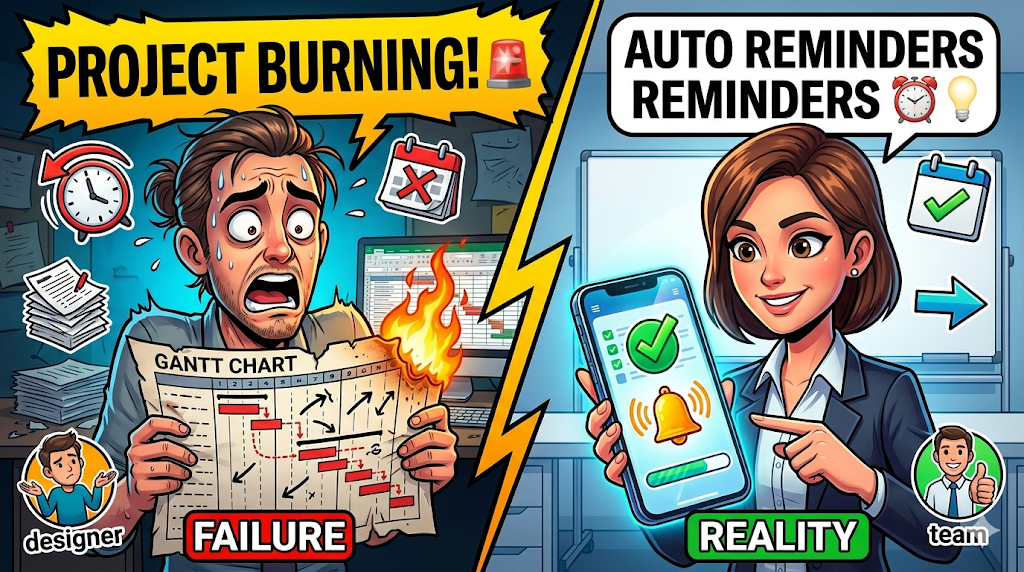
The designer delivered their part four days late, which delayed the developer. The client forgot to send the passwords. The copywriter wrote the wrong texts. When you open your beautiful Gantt Chart, you realize a terrifying truth: the real project and your diagram live in two completely different universes. Your master plan is now a historical artifact.
Why does this systematically happen in companies of all sizes? Why do schedules fail so quickly when faced with reality?
The problem is not the Gantt methodology. The problem is that a map is useless if it doesn’t have an engine that forces you to follow it. In this article, we’ll uncover why visual planning is incomplete and how the “Execution Link” (automated reminders) is the secret to making your schedules survive contact with the real world.
The trap of “Ghost Planning”
Creating a visual schedule generates a very dangerous neurochemical response: it releases dopamine. When a Project Manager (PM) or agency owner finishes building a Gantt chart, their brain rewards them with a false sense of accomplishment. It feels like the work is already under control—when in reality, the work hasn’t even started.
We call this phenomenon Ghost Planning. It is the act of designing a timeline architecture that exists in theory but has no active mechanism to enforce its execution in practice.
Why do teams ignore the Gantt Chart?
If you ask a designer, developer, or consultant how they organize their daily work, they’ll tell you they look at their immediate task list (a To-Do list or the “To Do” column in a Kanban board).
Rarely does an executor open the Gantt Chart at a macro level. For them, the Gantt is “a management tool.” Therefore, if the task they need to complete today doesn’t “scream” that it must be done today, they will postpone it.
If your Gantt lives in an Excel tab, a static PDF, or a platform the team doesn’t use for daily work, that schedule is dead from day one.
The Execution Link: Visualization vs. Action
To understand the failure, imagine buying a state-of-the-art GPS for your car. The map on the screen (Visualization) shows you exactly the route to your destination. However, if you deviate from the route, the GPS stays silent. It doesn’t recalculate, doesn’t warn you, doesn’t make a sound. It simply lets you get lost.
That’s how 90% of B2B schedules work.
For a schedule to work, it needs the Execution Link: a proactive system that connects the static plan with human action.
In the digital work era, the Execution Link has a name: Automated Asynchronous Reminders.
The human cost of lacking automation
When a Gantt chart doesn’t have automated reminders tied to its time blocks, the role of “reminder” falls on a human being. The project leader must become a human alarm.
They have to open the Gantt every day, mentally cross-reference data, realize Juan is behind, go to Slack, tag Juan, and say: “Hey Juan, according to the Gantt, this was due yesterday.”
This micromanagement not only costs thousands of dollars in non-billable hours, but also destroys team morale and creates unnecessary friction.
The “Dynamic Gantt” Framework
For your project’s reality to reflect your schedule, you must implement the Dynamic Gantt framework. This model transforms your plan from a static drawing into a living ecosystem that defends itself against delays.
Here’s how to implement it in three steps:
Step 1: View Unification (The Map is the Territory)
The first step is to ban creating schedules in isolated applications (like Excel or diagram tools).
The Gantt should simply be a mathematical view of the real tasks your team is executing. If a designer moves the “Homepage Design” card from Doing to Done in their Kanban view, the block in the Gantt chart should automatically turn green. The team and management must look at the same data—just from different angles.
Step 2: The Prevention Trigger (Pre-Deadline Reminders)
A dynamic schedule doesn’t wait for things to go wrong before alerting you. The system must be configured to trigger asynchronous alerts before disaster strikes.
If a Gantt block shows that the “Audit Phase” ends Friday at 5:00 PM, the software (not you) should send a push notification and email to the responsible person on Thursday at 9:00 AM: “Reminder: Your task is due in 32 hours.”
You’ve delegated memory stress to the software.
Step 3: Cascade Dependency Alerts
The real magic of a Gantt lies in its dependencies (Task B cannot start until Task A is finished).
In a Dynamic Gantt, if the owner of Task A is delayed, the system doesn’t just notify them. It automatically notifies the owner of Task B: “The task you depend on has been delayed; your start date has been adjusted.”
This eliminates the classic excuse: “I didn’t start working because nobody told me the client had already approved the copy.” The system informs. The system coordinates.
The Role of the “Rescue” Video Call (Troubleshooting)
By tying your schedule to automated reminders, you’ll eliminate 80% of delays caused by forgetfulness or poor personal organization. The system will keep everyone moving at a steady pace.
But what happens when the delay is real—not due to memory, but to a deep technical blocker? What happens when the system sends three automated reminders and the task in the Gantt is still dark red?
This is where Strategic Synchrony comes in.
When the Dynamic Gantt shows that a blockage won’t resolve itself, the Project Manager doesn’t send another email. They use their Appointments (Scheduling) link.
You schedule a 15-minute video call with the responsible person and the client. You turn on the camera and share the Gantt on the video call screen.
“Team, the system shows this milestone is blocked and is pushing next week’s launch. What’s the technical issue, and how do we solve it right now?”
You make the decision live, adjust the timeline block during the same call, the system recalculates new automated reminders for everyone, and you get back to work. The video call stops being a boring status meeting and becomes a surgical rescue operation.
Execute reality with GGyess WorkSuite
It’s frustrating to try applying the Dynamic Gantt philosophy if your tools are disconnected. If you use Smartsheet for Gantt, Slack for communication, and memory for deadlines, you’ll remain trapped in Ghost Planning.
The B2B ecosystem needed a platform that understands visualization and execution are two sides of the same coin. That’s why GGyess has evolved into the ultimate WorkSuite.
GGyess was redesigned specifically to connect your most ambitious plans with the raw reality of daily work:
- Effortless multidimensional views: In GGyess, you don’t “draw” a Gantt. You simply input your tasks (or let GGyess AI break them down for you), and with one click, you can view the project in Kanban (for execution) or Gantt (for dependency oversight). It’s the same data—alive and synchronized.
- Native Smart Reminders: GGyess’ engine is relentless. As soon as you assign a date in the Gantt or Calendar view, GGyess takes over as your “traffic controller,” sending automated reminders and alerts to your team and clients.
- Scheduling and video calls in one place: When the Gantt gets blocked, don’t leave the platform. Use the integrated Appointments system so your client can book time, and launch a native video call directly from the project view to recalibrate the plan face-to-face.
Visual planning is an art, but on-time execution is a business. Don’t let your best strategies die in a document no one checks.
Bring your schedules to life, automate task follow-ups, and ensure the profitability of every project. Make the switch to the ultimate WorkSuite today at ggyess.com.
Frequently Asked Questions (FAQ)
What is “Ghost Planning”?
It’s the operational phenomenon where a team invests time creating detailed schedules (like Gantt Charts) in static tools that are not connected to daily execution. As a result, the plan quickly becomes outdated and the team reverts to reactive work, ignoring the original document.
Why does a Gantt Chart need automated reminders?
A Gantt Chart shows the “When” and dependencies but requires users to proactively check it. By linking it with automated asynchronous reminders, the system “pushes” information to users—alerting them about deadlines and cascading changes—ensuring execution without human micromanagement.
What’s the difference between a traditional Gantt Chart and a “Dynamic Gantt”?
A traditional Gantt is usually a static, manual file (e.g., Excel) updated step by step by a manager. A Dynamic Gantt is a live mathematical view of an active task manager. When a task is marked “Done” in a daily workflow, the corresponding block in the Gantt updates automatically in real time for everyone.