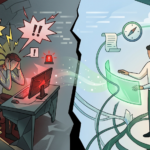
It’s 4:30 PM on a Thursday. You have a video call with an important client in fifteen minutes to review the progress of the new campaign. You know your team has been working hard, but suddenly, digital stage fright hits:
Where did the latest version of the presentation go? You remember the designer sent a link via Slack, but the copywriter left comments in a WhatsApp thread, the base file lives in a shared Google Drive folder you mysteriously lost access to, and the deadlines are on a Trello board no one has updated in two weeks.
You manage to pull everything together at 4:29 PM. You enter the meeting short of breath and mentally scattered. You survived, but the strain was absolute.
If this scenario feels familiar, your team doesn’t have a talent or time management problem. Your startup is suffering from a silent but lethal operational disease: Information Fragmentation.
As companies adopt remote or hybrid work, the default response has been to add more software. One tool for chatting, another for video calls, another for task management, another for file storage, and another for scheduling. The result? A digital labyrinth where context is lost and productivity dies a death by a thousand cuts.
What Exactly Is Information Fragmentation?
Information fragmentation occurs when data, context, files, and communications from the same project are scattered across multiple disconnected platforms.
Instead of having a “Single Source of Truth” (SSOT), your corporate knowledge is held hostage in silos. The core problem isn’t that the information doesn’t exist; it’s that the context connecting that information is broken.
Key insight: Fragmentation forces the human brain to make extra effort to connect the dots. This leads to what cognitive psychology calls “Working Memory Overload.” Your team isn’t tired from working too much; they’re mentally exhausted from searching for where to work.
Ephemeral Communication vs. Operational Documentation
One of the biggest drivers of this fragmentation is the confusion between communication tools and management tools.
Apps like Slack, WhatsApp, or email are fantastic for ephemeral communication (“What time is the meeting?”, “Great job on the design!”). However, they are terrible for operational documentation. When you try to manage a complex project, approve deliverables, or discuss client scope through chat, you bury critical information under an avalanche of irrelevant messages.
The 5 Critical Symptoms of Fragmentation in Your Team
To solve a problem, you first need to diagnose it. Check if your company shows any (or several) of these symptoms:
1. The “Digital Archaeologist” Syndrome
Your employees spend between 15% and 20% of their workweek searching for files, links, or past instructions. They jump from email search to Slack, then to Drive, digging through history to find the right document. This time isn’t just unproductive—it also disrupts creative flow (the famous Deep Work).
2. Decisions Based on “Final_Final_V3_ThisOne.pdf”
When files live disconnected from tasks, version control becomes chaos. Two team members might be working simultaneously on different documents—or worse, an outdated version might be delivered to a client or production. Lack of centralization increases human error and delays Time-to-Value (how fast you deliver real value to your client).
3. Slow and Painful Onboarding
When new talent joins your startup, what does their first week look like? If onboarding means giving access to 8 different platforms and saying “check the history to catch up,” you’re guaranteeing a slow and frustrating learning curve. Institutional knowledge isn’t documented in a process—it’s scattered across the collective memory of senior employees.
4. Dependence on “Human Silos”
What happens if your main Project Manager gets sick or goes on vacation? In fragmented companies, projects stall. That’s because project status, client agreements, and next steps exist only in that person’s head or private inbox. The information belongs to the individual—not the company.
5. Context Switching Fatigue
Every time a team member switches from one app to another (for example, from Zoom to Asana, then to a document), their brain takes an average of 23 minutes to regain full focus. This constant friction destroys efficiency. They appear “busy” all day jumping between tabs, but by the end of the day, the business needle has barely moved.
The Hidden Cost: What You Don’t See in Your P&L
Many founders and operations leaders tolerate fragmentation because they think the only impact is “a bit of disorder.” In reality, the hidden cost directly affects profitability:
- Redundant subscriptions (SaaS Waste): You’re paying hundreds or thousands of dollars monthly for multiple software licenses that each cover only 20% of your needs—just because your team prefers using the “trendy tool” instead of unifying processes.
- Client churn due to poor perception: Late deliveries, disorganized calls, and asking clients for the same information twice project a lack of professionalism.
- Team burnout: Micromanagement is born from fragmentation. Since leaders can’t see progress at a glance, they constantly interrupt with “How’s this going?” This cycle creates anxiety and frustration.
Framework to Unify Your Knowledge Base
If you recognize these issues, it’s time to stop the operational bleeding. Unifying your knowledge base requires a cultural shift supported by the right technology. Here’s a simple three-step framework:
Step 1: Establish the “Single Source of Truth” Rule
Your team must agree that if something isn’t in the central system, it simply doesn’t exist. Hallway conversations or WhatsApp voice notes must immediately be translated into updates within the management platform. Context must live alongside the task.
Step 2: Unify Files, Conversation, and Tasks
The biggest management mistake is separating “what needs to be done” from “what it’s done with.” Implement a model where each task or project card contains:
- Clear instructions (the What)
- Deadlines and owners (the Who and When)
- Attached files and documents directly inside
- A comment space for discussion specific to that task, removing it from general chat channels
Step 3: Merge Sync and Async Work
Meetings (sync) and individual work (async) shouldn’t live in separate ecosystems. If you schedule a review call, the agenda, reminders, and meeting link should originate from the same project board—not from an isolated calendar.
The End of Fragmentation: Do More with Less
Reaching this level of efficiency used to require complex integrations (like Zapier), system engineers connecting APIs, and hours of configuration to make apps “talk” to each other. But the market has evolved.
You no longer need 10 different subscriptions to keep your team aligned. The answer to information fragmentation is total centralization.
This is where GGyess comes in.
GGyess has evolved into the ultimate WorkSuite that eliminates fragmentation at its root. It’s no longer just a productivity tool—it’s an intelligent operational hub.
Instead of jumping between apps, with GGyess you centralize project management (Kanban, Gantt, Calendar) and keep all your files directly tied to tasks. Need to discuss a deliverable? Launch integrated video calls directly from your workspace. Working with external clients or freelancers? Use the appointments system and automated reminders so everyone knows exactly when and what needs to be delivered—without sending a single email. All powered by AI to structure projects in seconds.
You don’t need more hours in the day—you need a plan you can trust. And most importantly, you need your team to stop searching for work and start doing it.
Discover how to simplify your workflow and centralize your success today at ggyess.com.
Frequently Asked Questions (FAQ)
What is Context Switching and how does it affect my team?
Context switching is the act of constantly jumping between different tasks or applications (e.g., from email to chat to project management tools). It consumes cognitive energy, reduces focus, and can lower overall productivity by up to 40%.
Why is it risky to use WhatsApp or chats for project management?
Chats are linear and ephemeral. Burying instructions, feedback, or files in chat threads prevents structured tracking, breaks version control, and makes information nearly impossible to retrieve weeks later—especially for new team members.
What does “Single Source of Truth” (SSOT) mean in project management?
It’s a practice where all key information, files, and decisions for a project are stored in a single centralized platform. This eliminates ambiguity, prevents duplicate work, and ensures the entire team operates with the same up-to-date data.