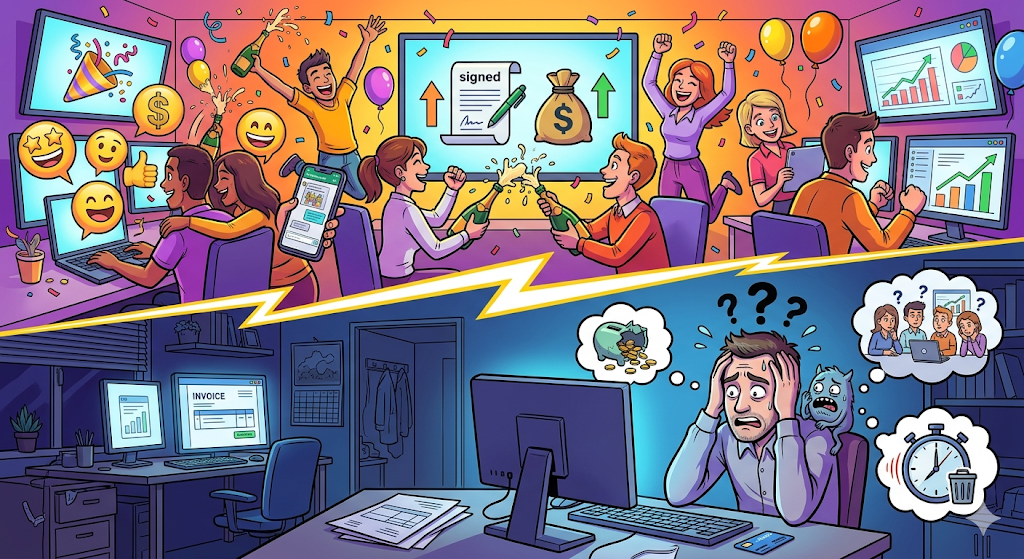
The moment of greatest excitement in a digital marketing agency happens when the client signs the contract and makes the first payment. There are celebrations in the team chat, the sales pipeline gets updated, and there’s a sense of victory in the air.
But at that exact same moment, in your new client’s mind, the opposite psychological phenomenon is happening: buyer’s remorse.
They’ve just spent a significant amount of money. Their limbic brain—responsible for survival and risk aversion—sounds the alarm. They wonder: “Did I make the right decision? Will this agency really understand my business? What if they waste my budget?”
What you do in the next 72 hours will determine whether that client stays with you for years (multiplying their Lifetime Value) or becomes a recurring headache who cancels after three months.
That critical period is called Onboarding (the welcome and integration process). And unfortunately, 80% of marketing agencies do it terribly wrong.
In this article, we’ll break down the psychology behind a successful onboarding process, the operational mistakes that are undermining your agency’s authority, and the exact step-by-step structure to create a client experience so smooth, professional, and automated that it eliminates doubt and ensures long-term retention.
The Anatomy of the Disaster: Why Your Current Process Scares Clients Away
To understand how to build the perfect onboarding, we first need to audit the traditional one. See if this sounds familiar:
Day 1: The client pays. You send a “Welcome” email that includes:
- A Calendly link to schedule the kickoff call
- A long Google Forms or Typeform questionnaire asking for passwords, Facebook Business Manager access, and brand guidelines
- A link to create an account in Asana, Trello, or ClickUp to “track progress”
- A shared Google Drive folder to upload logos and assets
Day 3: The client, overwhelmed with their own responsibilities, ignores the email.
Day 5: You send a WhatsApp reminder asking them to complete the form. The client schedules the call but forgets to upload files to Drive.
Day 7: You join a Zoom call. You spend the first 15 minutes solving technical issues (“I can’t hear you,” “Can you resend the link?”). The meeting lacks structure because you don’t have the necessary information.
The result? The client feels like they’ve just signed up for extra administrative work. Instead of feeling relieved, they feel burdened with tasks across five platforms they don’t know how to use.
Friction is the number one enemy of trust. When the relationship starts in chaos, your perceived value drops sharply—no matter how good your campaigns are.
The Psychology of “Control” in B2B Services
In the B2B (Business to Business) world, clients buy results—but they stay for the feeling of control.
When a business owner delegates their marketing, they’re handing over a critical part of their company. To reduce anxiety, they need immediate proof that the experts (you and your team) have a reliable system.
Consumer neuroscience shows that the brain seeks predictable patterns to feel safe. If your onboarding consists of scattered emails and fragmented tools, the client’s brain perceives “chaos” and goes into defensive mode (micromanagement). They’ll ask for daily reports, question your copy, and want to review every design in detail.
On the other hand, if your onboarding is a straight line, in one environment, with clear steps, the client’s brain relaxes. It perceives “authority.” They trust the process and let you do your creative work.
The Zero-Friction Onboarding Blueprint
To transform your client experience, you must eliminate cognitive friction points. That means fewer links, fewer platforms, and fewer emails.
Here’s the 4-step structure used by the most profitable agencies to scale operations and impress clients from day one.
Step 1: Welcome Portal and Instant Scheduling (Appointments)
The moment to capitalize on the excitement of a closed deal is immediate. Instead of sending an email with multiple instructions, the client should receive a single access point to a “Project Portal.”
Inside this professional environment (branded with your agency identity), the first call to action is scheduling the kickoff meeting.
Don’t send them to external software—use an integrated Appointments system. The client sees real-time availability, selects a time slot, and the system automatically blocks your calendar and triggers a sequence of smart reminders.
No confirmation emails needed. The client feels they’re interacting with a high-level technological infrastructure.
Step 2: Centralized Kickoff Call (Video Calls)
The meeting day arrives. The classic mistake is sending a Zoom or Google Meet link 10 minutes before, forcing the client to search their inbox or WhatsApp.
In a perfect onboarding, the video call happens in the same place where the project lives. The client simply logs into their portal and joins the meeting.
During this call, your goal isn’t to talk about yourself—it’s to extract all brand knowledge:
- What is your ideal customer’s main pain point?
- What are the expected KPIs for the first 90 days?
- What tone of voice should communication have?
Here’s the retention trick: while talking, you share your screen and show how all the information is being documented in real time within the project board. You’re demonstrating transparency and organization live.
Step 3: From Idea to Execution in Seconds (The Power of AI)
This is where traditional agencies get stuck. After a one-hour kickoff call, the Account Manager spends the entire afternoon transcribing notes and manually creating dozens of tasks.
Modern onboarding demands speed. If clients don’t see activity quickly, anxiety returns.
This is where AI becomes your operational advantage. Advanced platforms can take meeting notes and, using AI, structure a complete project in under 30 seconds.
The system understands the campaign goal and automatically breaks it down:
- Task 1: Copywriting (assigned to writer)
- Task 2: Creative design (assigned to designer)
- Task 3: Campaign setup in Meta Ads (assigned to media buyer)
- Task 4: Internal review and client approval
Show this to the client hours after the call. The psychological impact is massive—they see their investment already in motion.
Step 4: File Consolidation (The End of the Treasure Hunt)
The final step is asset collection (logos, brand guides, videos, databases).
Don’t ask clients to use WeTransfer or messy Drive folders. Top agencies store files within the tasks themselves.
When a client uploads a logo, it goes directly into the project workspace. When a designer needs it, they don’t search through folders—it’s right next to the task instructions.
This prevents expired links, permission issues, and wasted time searching for files.
How Efficient Onboarding Directly Impacts Profitability
Structuring your onboarding this way isn’t just about aesthetics—it’s a critical financial decision for three reasons:
- Lower Customer Acquisition Cost (CAC): A smooth onboarding boosts satisfaction. Happy clients leave testimonials within the first 30 days and refer others—bringing in new business at zero ad cost.
- Elimination of Non-Billable Work: Time spent creating folders, setting up tools, and chasing links is paid by you but not billable. Automation recovers dozens of hours per month.
- True Scalability: You can’t scale to 50 or 100 clients if your process depends on team memory. A structured onboarding lets you absorb new clients like a well-oiled assembly line without losing quality.
The WorkSuite Era: GGyess and Perfect Onboarding
If you’re thinking: “This sounds great, but I’d need to connect my calendar, Zoom, Asana, and Drive with Zapier—and that would be expensive”—you’re absolutely right.
Trying to build this experience with fragmented tools is both a technical and financial nightmare. And that’s exactly why the rules have changed.
To deliver zero-friction onboarding, you need to stop renting separate tools and start operating from a single command center.
GGyess has redefined the industry by consolidating everything you need into the ultimate WorkSuite.
With GGyess, chaotic onboarding becomes a premium experience—without external tools. Here’s what your new workflow looks like:
- Smart Scheduling (Appointments): Send your personalized GGyess link. The client books the kickoff call and the system handles reminders automatically.
- Integrated Video Calls: No more “I can’t find the Zoom link.” Meetings happen directly inside GGyess in a professional, secure environment.
- AI-Powered Structuring: After the meeting, write the campaign idea in plain language and let GGyess AI turn it into a structured project with tasks, priorities, and deadlines in seconds.
- Files and Tasks in One Place: Clients upload assets directly into the project. Your team collaborates and executes without switching between tools.
Your client perceives order, control, and professionalism. Your team regains creative focus. And you drastically reduce your monthly software costs.
It’s time to stop scaring clients during their first days. Transform your onboarding process, strengthen your agency’s authority, and secure long-term retention. Visit ggyess.com and start operating like a world-class marketing firm today.