January 2026. Being a UGC (User Generated Content) Creator is probably the most profitable and flexible job of the moment. Brands pay you for your creativity, not your follower count.
But there is a dark side no one talks about on TikTok: Logistical Hell.
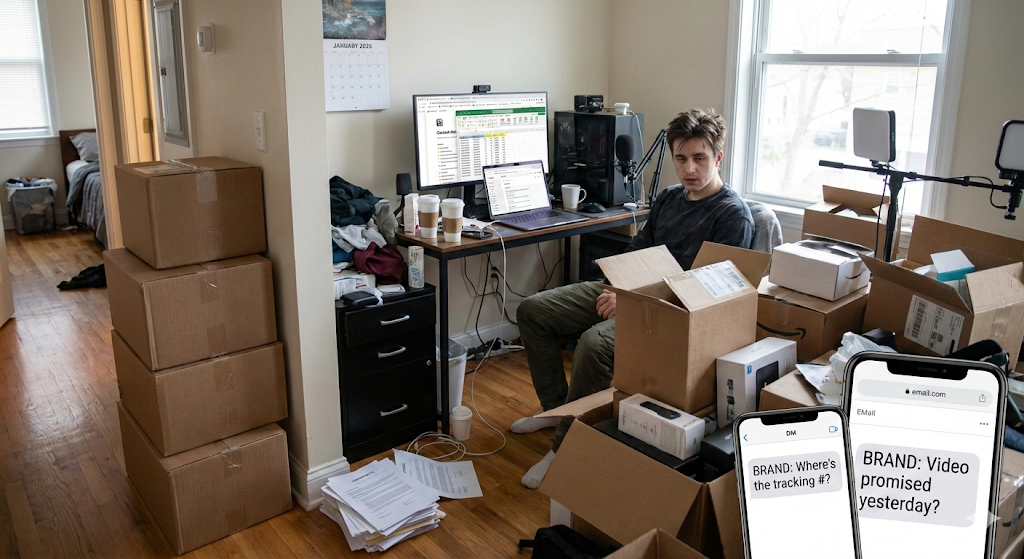
If you are doing well, your reality looks something like this:
- You have 4 unopened boxes of products in your hallway.
- A brand is DMing you asking for the return tracking number.
- Another brand is emailing asking where the video is that you promised yesterday (and you swear you sent via WeTransfer).
- You have 3 signed contracts lost in your computer’s “Downloads” folder.
- You are using a “Frankenstein” mix of tools: Notion for ideas, Excel for finances, Gmail to talk, Drive to send, and WhatsApp to complain.
The result: You spend more time managing files than filming content. And that limits your income ceiling. You can’t accept more clients because your current system would collapse.
Today we are going to see how to professionalize your UGC business using GGyess, moving from being a “messy creator” to a “micro-production agency.”
The “WorkSuite” as Your Command Center
The first mistake of the UGC Creator is treating each video as a loose task. In GGyess, we treat every collaboration as a Project.
Imagine opening your WorkSuite and seeing a Kanban Board with these columns:
- Negotiation/Contract: (Here you upload the PDF of the signed contract in the Task Files tab).
- Product on the Way: (In the task description, you put the Tracking Number of the package you are expecting).
- Scripting: (You use GGyess AI to break down the brand brief into a technical script).
- Filming/Editing: (Your to-do list for today).
- Client Review: (Where the video awaits approval).
- Invoiced/Paid: (The best column!).
At a glance, you know exactly which brand owes you money and which brand is waiting for a video. No more “Did I forget something?”
The Deliverables Nightmare (Solved)
The biggest friction point with brands is delivery.
- Brand: “The Drive link expired.”
- Brand: “It won’t let me download the video.”
- Brand: “Can you send it via Telegram? It’s smaller.”
With GGyess, you act like a professional. Inside each Project Task (e.g., “Skincare Campaign – Video 1”), you upload the final high-quality video to the Files section. Then, you invite your brand contact as a Guest to that specific task (or share the project link if permissions allow). They enter, view the video, download it, and mark the task as “Approved.”
No lost emails. No broken links. Everything is recorded in the project history.
“When a brand sees you have a professional delivery portal, they automatically perceive you as a Premium service. And Premium services charge more.”
Your Own Brand Counts Too (SocialSuite)
Many UGC creators make the mistake of abandoning their own social media to serve clients. “The cobbler’s children have no shoes.” But your Instagram/TikTok profile is your Living Portfolio. If you stop posting, brands stop calling.
This is where the GGyess SocialSuite comes in: While you work on client videos, you dedicate 1 hour a week to scheduling your content.
- Upload your own “Behind the Scenes” or “UGC Tips” Reels.
- Use the Visual Calendar to ensure you have a constant presence.
- Leave it scheduled and forget about it.
Thus, while you are filming for a client, your “Digital Self” keeps automatically selling your services on social media.
AI Brief Management (Your Script Assistant)
Sometimes, brands send you a 20-page brief (instructions) that is impossible to digest. Or worse, they say “Do whatever you want” and you go blank.
Use the GGyess AI inside the task:
- Copy and paste the messy brand brief.
- Tell the AI: “Summarize this into a list of 3 key points and generate 2 visual hook ideas for a 15-second TikTok video.”
- In 10 seconds, you have your shooting plan ready.
This cuts your pre-production time in half.
Contracts and Usage Rights
A huge pain point in 2026 is controlling Usage Rights. Did you sell the video to the brand for 3 months or 1 year? If you don’t keep track, you are losing renewal money.
In GGyess WorkSuite, you can use Tags or Due Dates on tasks for this.
- Create a task: “Brand X Rights Expiration.”
- Set the date: January 24, 2027.
- Schedule an alert.
In a year, GGyess will notify you. You write to the brand: “Hi, the usage rights for my video expire today. Would you like to renew them for another 6 months?” It is free money you were previously losing due to disorganization.
Profitability: How Much is Your Filming Hour Worth?
If you spend 10 hours a week organizing emails and searching for files, and you charge $50 an hour to create content… Your disorganization is costing you $500 a week.
The GGyess MasterSuite plan costs $9.99 a month. It is a ridiculous investment compared to the time you recover to do what makes you money: filming.
Plus, you replace:
- Extra Storage Subscription ($10)
- Task Management Tool Subscription ($15)
- Social Scheduler Subscription ($20)
Conclusion: You Are a Business, Act Like One
The UGC market in 2026 is saturated with amateurs. The way to stand out and get recurring contracts (“Retainers”) with big brands isn’t just having good lighting. It is being reliable.
If you deliver on time, in an organized way that is easy for the brand, they will hire you again. GGyess is the tool that gives you that corporate structure, allowing you to remain a free creator, but with the order of an agency.
Organize your UGC business today. Try GGyess free and surprise your next brand with your professionalism.