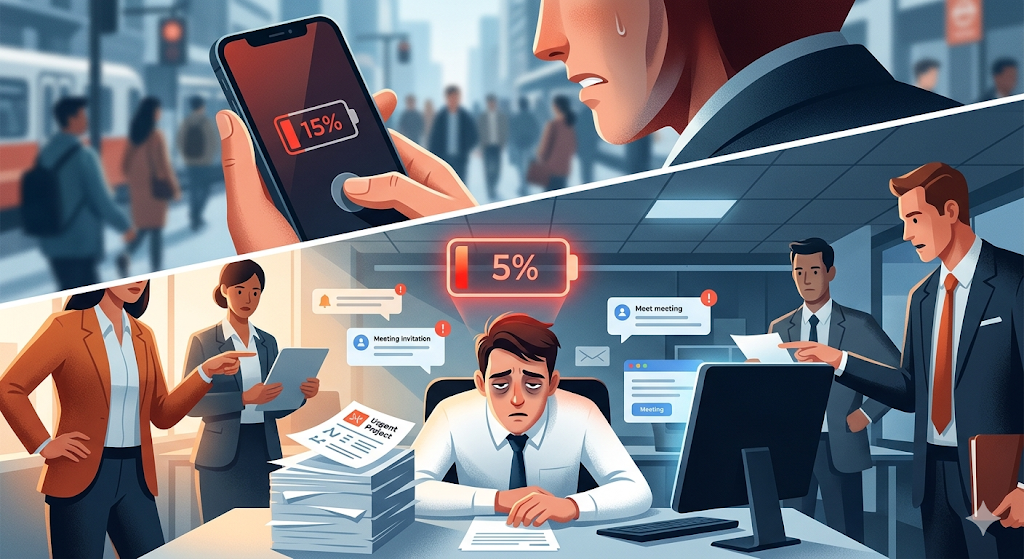
Let’s admit it: we all share a modern anxiety. You’re out of the house, you pull your phone out of your pocket, and you see that the battery icon in the top-right corner has turned red. It shows 15%. Suddenly, your behavior changes completely. You close apps you’re not using, lower the screen brightness to the minimum, turn off Bluetooth, and enter survival mode while desperately searching for a charger.
We protect the battery of our electronic devices with our lives. We perfectly understand that if we demand too much from a phone that’s at 5%, it will simply shut down and leave us disconnected.
However, when it comes to the most valuable, complex, and expensive resource in our companies—the minds of our collaborators—we completely ignore this logic.
We see a team member who is visibly exhausted, with dark circles under their eyes, making unusual mistakes, and clearly operating at 5% of their capacity. And what do we do in the traditional corporate world? We assign them an “urgent” project due Friday, invite them to three one-hour meetings, and then act shocked and outraged when, weeks later, that person resigns due to burnout.
Treating your team as if it has infinite energy is not leadership; it’s negligence. Today we’re going to learn how to read your team’s “battery percentage,” understand which applications are draining their energy, and implement a system to balance workloads before a massive shutdown occurs in your company.
The Anatomy of the Human Battery: Not All Tasks Consume the Same Energy
The first major mistake leaders make when measuring productivity is believing that “time” equals “energy.” We assume that if someone has an eight-hour workday, they have eight hours of peak creative capacity.
Let’s go back to the phone analogy. If you use your phone for an hour to read a text document with low brightness, the battery might drop 2%. But if you use that same phone for an hour to play a heavy 3D video game with maximum brightness and mobile data on, the battery might drop 30% and the phone will heat up. The usage time was exactly the same (one hour), but the energy drain was radically different.
In daily work, tasks function exactly the same way:
• Low-consumption apps (Mechanical tasks): Responding to routine emails, approving expenses, organizing folders, or updating the status of a database. They require time but have a low cognitive load.
• High-performance apps (Deep tasks): Writing code from scratch for a new feature, designing a brand’s visual identity, writing a persuasive article, or planning the financial strategy for the quarter. These tasks demand absolute concentration and drain “mental battery” at a dizzying speed.
If, as a leader, you only look at the number of tasks or the hours on the clock, you are blind. You might see that Laura only has “two tasks” today and assume she’s free, without realizing that those two tasks are the equivalent of running a high-demand video game. If you keep adding “little tasks,” you’re going to overheat her system.
The Silent Killer: Background Apps
Have you ever left your phone on the table with the screen off, and when you return two hours later you discover the battery dropped by 20%? That happens because of apps running in the background: location trackers, automatic updates, or email synchronization. You’re not actively using the phone, but the energy is leaking away.
In collaborative work, teams also suffer from “background consumption.” These are energy leaks that don’t appear in job descriptions or project boards but still push people toward collapse.
1. Constant Context Switching
You’re writing an important report (focused battery). Suddenly, a chat notification pops up: “Hey, where did the new logo go?” You pause your brain, open the cloud storage, search for the logo, send it, return to the report. Ten minutes later, you receive an urgent email.
Every time an employee jumps from deep work to an interruption and back, their brain spends a massive amount of energy “reloading” the context of what they were doing. A workplace full of interruptions drains people long before noon.
2. The Meeting Epidemic (Wi-Fi Searching for Signal)
Being in a meeting where you don’t have an active role—or where the topic could have been resolved with a simple message—is like leaving your phone’s Wi-Fi on in the desert. It’s constantly searching for signal, draining battery without connecting to anything useful. Eight hours of meetings might produce not a single deliverable, but they will leave your team mentally exhausted.
3. Ambiguity and Micromanagement
Not knowing exactly what is expected of you creates anxiety, and anxiety is a background mental process that consumes enormous resources. Similarly, having a boss constantly breathing down your neck (micromanagement) forces you to spend energy on looking busy instead of spending it on being productive.
How to Detect “Low Power Mode” in Your Team
When your phone reaches 20%, the screen dims slightly and processes become slower. The phone still works, but its performance is limited to survive.
When humans enter low-power mode (the early stages of burnout), they also show clear signals. The problem is that managers often mistake these signals for “laziness” or “lack of commitment,” instead of seeing them for what they really are: a red alert of low battery.
• Loss of creativity: Exhausted people stop proposing innovative ideas. They limit themselves to doing the bare minimum needed to avoid getting fired. Lateral thinking requires a level of energy they simply don’t have anymore.
• Cynicism and negativity: If someone who used to be enthusiastic suddenly responds with sarcasm, complains about new projects, and shows general apathy, they haven’t become a bad person; they’re protecting the little energy they have left through emotional detachment.
• Decline in quality (simple mistakes): The most meticulous employee suddenly forgets to attach a file, sends an email with serious spelling errors, or makes a mistake in a basic calculation. Their working memory is saturated.
If you notice these symptoms and your response is to give them a motivational speech or demand more commitment, you’re trying to turn on the flashlight of a phone that’s shutting down. What they need isn’t motivation; it’s workload redistribution and a charger.
Charging Strategies: How to Balance the Voltage in Your Company
Preventing burnout and keeping your team in the optimal energy zone (between 80% and 40%, where we are most productive and creative) requires intentionality. Here are the rules to become an expert energy manager.
1. Implement the Battery Widget (Radical Visibility)
You can’t balance what you can’t see. You need a system where each person’s workload is public and transparent.
If you’re going to assign Carlos the task of organizing the annual event, you must first be able to visualize what else is on Carlos’s “plate” this week. If you don’t have a visual map of everyone’s workload, you’ll be distributing tasks blindly, based on who replies fastest instead of who actually has the capacity.
2. Weigh Tasks, Don’t Count Them
Abandon the metric of “number of tasks assigned.” Start measuring effort.
Some agile methodologies use “Story Points” or simple hour estimates. Before a task enters someone’s board, the leader and the employee should agree on how “heavy” that application is. If a person’s weekly limit is 40 energy points and you’ve already assigned them a project worth 35 points, you know that person only has room for minor tasks the rest of the week.
3. The 80% Rule: Never Load to 100% Capacity
This is the secret of high-performance teams that never burn out. They never plan an employee’s week to occupy 100% of their working hours.
100% is a utopia. In the real world, servers crash, clients change their minds, and coworkers get sick. If someone is scheduled at 100% and a two-hour emergency arises, that person will have to work late at night. Always plan at 80%. That 20% of “white space” is the buffer needed to absorb chaos without generating chronic stress.
4. Encourage “Do Not Disturb” (Asynchronous Deep Work)
For your team to recharge during the day, they need uninterrupted spaces. Establish clear cultural rules. For example: “From 10:00 a.m. to 12:00 p.m. is deep-work time. Immediate chat responses are not expected and meetings should not be scheduled.”
By turning off notifications, you allow your team to run the “heavy applications” efficiently and quickly instead of dragging them out throughout the entire week.
5. The Real Charger: Respect Disconnection
Finally, the charger only works if you leave it plugged in. Sending emails to your team on Sunday afternoon or at 11:00 p.m. interrupts their recharge cycle. Even if you say, “You don’t have to reply until Monday,” simply reading the notification generates a spike of cortisol and stress. Respect your team’s downtime as if it were sacred.
GGyess: The Ultimate Energy Management System
It’s easy to say we should measure effort, visualize tasks, and avoid overloading people. But if you try to do all this by constantly asking “How’s your time looking?” or updating an endless spreadsheet, you’ll exhaust yourself. Empathy without the right technology quickly turns into managerial stress.
You need a smart monitor for your company. You need GGyess.
We designed GGyess because we understood that traditional productivity tools push people to do more things instead of doing the right things. We built an ecosystem that not only organizes work but also protects the sanity of the people doing it.
In GGyess, the “battery widget” is a reality. When you enter your workspace, you have access to a dedicated Workload view. In a single visual and intuitive screen, GGyess shows the columns for each member of your team. It tells you exactly who is operating within a healthy range, who has space to absorb a new challenge, and—most importantly—the platform triggers red visual alerts when a collaborator has exceeded their maximum allowed capacity for the week.
If you discover that the lead developer is at 120% capacity, you don’t need to convene a crisis committee. Within the same GGyess view, you simply take one of their tasks and drag it to the column of another team member who is at 40%. The platform instantly transfers all the context, files, and responsibilities. You’ve just saved someone from burnout with a flick of the wrist.
But we went a step further so you won’t even have to put out fires. Our integrated Artificial Intelligence acts as the most sophisticated energy manager on the market.
When you have a new large initiative in mind, you describe the project to GGyess’s AI. Instead of dumping an unmanageable list of tasks, the AI analyzes the project, breaks it down into logical blocks, and—knowing your team’s roles—intelligently distributes the workload. It assigns staggered deadlines, ensuring no one receives an avalanche of deliverables in the same week. It gives you a plan that is not only ambitious but also humanly sustainable.
In addition, GGyess eliminates “background consumption” by centralizing all communication. No more constant context switching. Your employees no longer have to jump between email, corporate chat, and cloud storage. Everything they need to execute a task lives inside the same GGyess card. They enter, focus, execute, and finish—preserving their valuable cognitive energy.
A company does not become successful by squeezing its talent to the last drop and searching for replacements when they break. A truly unstoppable company is one that knows how to care for the battery of its people, ensuring that everyone has the energy needed to contribute their brightest ideas day after day.
Stop pushing your team toward shutdown. Balance your workloads, protect your talent, and achieve truly sustainable growth with GGyess.