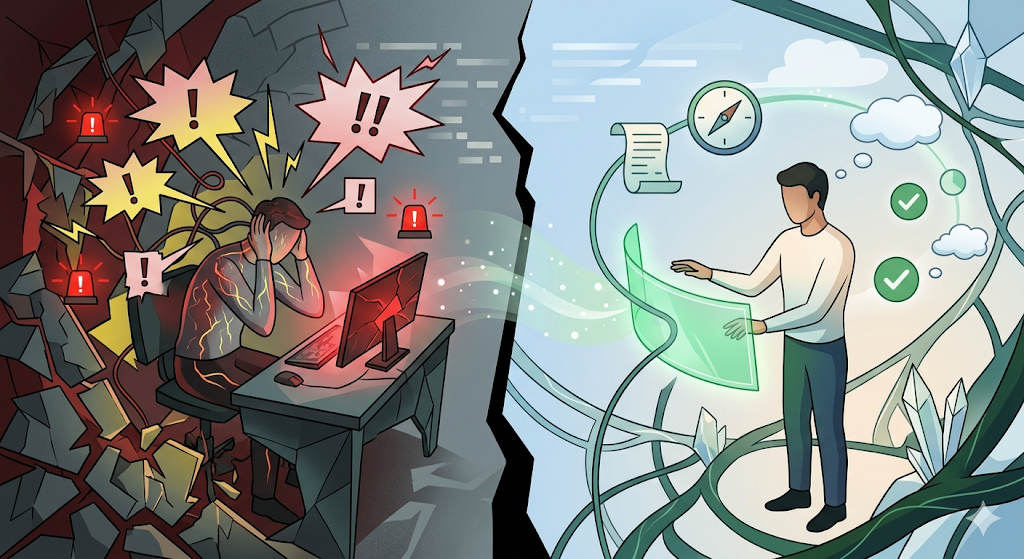
The physiological response is virtually immediate. A sudden ping echoes from your laptop speakers. A red badge appears in the corner of your screen. A banner drops down, demanding your immediate attention. In a fraction of a second, your brain is forced to abandon its current train of thought and assess a completely new stimulus.
In the modern digital workplace, our attention has been unintentionally weaponized against us. We have built an operational culture that confuses hyper-connectivity with productivity, resulting in an environment where professionals are constantly bombarded by disjointed, overlapping alerts.
But not all digital alerts are created equal. There is a profound psychological and architectural difference between a notification—a disruptive, out-of-context demand for attention—and a reminder—a supportive, contextual nudge designed to keep you aligned with your goals.
To build an elite, high-velocity organization, leaders must recognize that the way their software communicates with their team is just as critical as the actual work the team is doing. We must evolve from an era of notification anxiety into a new paradigm of contextual architecture.
The Psychology of Cognitive Siege
To truly understand the damage caused by poorly designed alerts, we must look at how the human brain processes interruptions. Every time a worker is pulled away from a complex task by a random notification, they experience a “context switch.”
While the physical act of switching tabs or clicking a notification may only take seconds, the cognitive recovery is immense. Psychologists refer to this as “attention residue.” When you pivot from a deep-focus task to answer a disjointed chat message, a significant portion of your cognitive bandwidth remains stuck on the previous task. Studies consistently show that it can take over twenty minutes for the brain to clear this residue and return to a state of absolute, creative focus after a single interruption.
When you multiply this phenomenon by dozens of disjointed pings throughout the day, the result is catastrophic cognitive fatigue.
When a professional is operating within a fragmented tech stack, their brain is placed under cognitive siege. They exist in a state of continuous partial attention. Cortisol levels rise. The mind attempts to protect itself by developing “notification fatigue,” a psychological adaptation where the user begins to subconsciously ignore all alerts just to survive the workday. Consequently, critical project deadlines are missed, client communications fall through the cracks, and team alignment shatters. The very system designed to keep the team informed becomes the exact mechanism causing them to fail.
The Fatal Flaw of the “Franken-Stack”
The root cause of notification anxiety is not the existence of alerts themselves; it is the fundamental architecture of the tools we use. Most modern teams operate on a “Franken-stack”—a chaotic patchwork of standalone applications forced to exist side-by-side.
Consider the daily digital experience of a typical project lead:
- Their standalone calendar app sends an alert that a client appointment is starting in five minutes.
- Their isolated project management tool sends an automated email that a design task is overdue.
- Their third-party chat application buzzes with a direct message about an entirely different marketing campaign.
- Their cloud drive pushes a notification that a new file has been uploaded to a nested folder.
Because these applications do not share a unified data environment, they are entirely blind to one another. Your chat app does not know you are on a tight deadline in your task manager. Your calendar does not know you are deeply focused on a creative deliverable. Every single tool assumes its update is the absolute most important event in your universe.
When everything is treated as an emergency, nothing is a priority. The lack of an overarching contextual hierarchy turns the digital workspace into a crowded room where a dozen different managers are shouting conflicting instructions at the same time. The manual setup, fragmented views, and excessive integrations force heavy manual input and constant context switching.
Rebuilding with Contextual Architecture
The only cure for notification anxiety is to rebuild the operational foundation from the ground up. We must abandon fragmented subscriptions and disjointed features, consolidating them into a singular, cohesive ecosystem. We must transition to a unified WorkHub.
When your task workflows, project boards, interactive canvases, and file storage all live in the exact same workspace as your team communication and scheduling, the system achieves absolute contextual awareness. It allows teams to track progress with precision, utilizing filters, smart views, and AI insights to uncover blockers.
In a unified architecture, alerts are no longer generated in a vacuum. The system understands the holistic scope of your day. It knows what your priorities are, it knows when your deadlines are approaching, and it knows exactly where your files are located because every file stays connected to the project and easy to find. This means the software can intelligently curate its communications. Instead of barraging you with meaningless pings, an integrated WorkHub issues proactive reminders that act as cognitive scaffolding.
Designing Reminders the Brain Wants to Process
A highly productive digital operation relies on reminders that respect the user’s focus. How do we design alerts that the brain actually welcomes? By ensuring they are anchored in customization, artificial intelligence, and spatial context.
- Custom Notifications for Absolute Control: Users must have full authority to dictate how and when they are interrupted. An elite system allows professionals to receive custom notifications to always stay on top of what is important, without missing any crucial updates or deadlines. By tailoring the notification intervals, the user protects their deep-work cycles.
- AI-Powered Relevancy: Artificial intelligence changes the nature of operational follow-ups. Instead of a rigid, automated email, a built-in AI acts as a strategic assistant, capable of summarizing progress, identifying bottlenecks, or suggesting the most critical next steps directly within the workspace. By allowing users to chat with the AI about tasks, assignments, and deadlines within the project, team members pull the exact information they need, rather than having irrelevant data pushed onto them disruptively.
- Spatial Context: A reminder is only useful if the user knows exactly where to act on it. In a unified WorkHub, a reminder about a task deadline links directly to the specific visual board where that task lives. The user does not have to open a new app or search through a third-party portal; the alert and the execution happen in the same spatial dimension.
The Synergy of Native Video Calls and Appointments
The most disruptive notifications in the modern workday are often meeting alerts. In a fragmented setup, a calendar reminder triggers a chaotic scramble to locate a third-party video link, pulling the user entirely out of their creative environment and breaking their workflow.
When we bring appointments and video calls directly into the WorkHub, we eliminate this friction entirely. An appointment is no longer an external disruption; it is a native event deeply integrated into the project’s timeline. The reminder simply tells you that your scheduled strategy session is beginning.
With one click, you launch a native video call directly inside the workspace. You do not leave your project boards. You do not abandon your active workflow. You and your team—or your client—are speaking face-to-face while looking at the exact same interactive whiteboard where teams can sketch, connect, and plan as one.
Because the conversation happens natively inside the WorkHub, the immediate aftermath of the appointment is completely frictionless. You can turn those visual brainstorms into actionable tasks instantly on the shared whiteboard. Even better, you can write what you need done in plain language, and the AI assistant immediately breaks it into detailed, actionable tasks with deadlines, priorities, and assigned owners.
The transition from a video appointment to an active, structured project plan happens in 30 seconds. There is no “ghost work.” There is no lost context. There are no secondary alerts reminding you to update your task boards later that evening, because the execution pathway was built while you were still on the call.
Reclaiming Your Mental Bandwidth
The digital tools we use should act as an elegant extension of our cognitive capabilities, not a relentless assault on them. A business cannot effectively scale if its foundational software constantly shatters the concentration of its best talent.
By actively designing a workspace that replaces notification anxiety with an intelligent, supportive reminder architecture, leaders can protect their team’s creative bandwidth. A unified ecosystem eliminates the noise of the Franken-stack, ensuring that every alert is meaningful, contextual, and directly tied to strategic execution. We must stop allowing software to dictate our attention and start demanding environments that respect it.
This philosophy of absolute focus, architectural elegance, and contextual intelligence is the core of the new GGyess. Redesigned from the ground up for high-velocity teams, agencies, and independent professionals, GGyess has shed the fragmentation of typical software to become a pure, uncompromising productivity engine. By centralizing your entire operation into a single, highly intuitive WorkHub, GGyess replaces chaotic pings with customizable, smart reminders. Featuring native appointment scheduling, built-in video calls, and an advanced AI assistant that generates complete project structures in seconds, GGyess ensures your team never has to switch apps to execute their vision. Reclaim your focus, protect your cognitive bandwidth, and experience frictionless growth with GGyess.