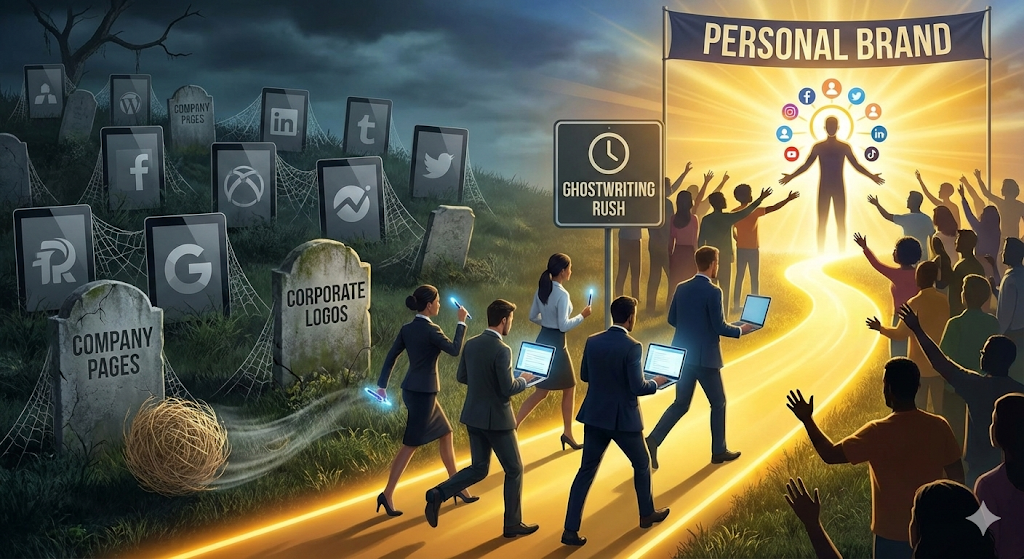
It is January 24, 2026. The digital marketing market has undergone an irreversible mutation. Company Pages are digital graveyards; no one interacts with corporate logos anymore. The algorithms of LinkedIn, and now Threads and X (Twitter) as well, have passed judgment: People follow people.
This has triggered a gold rush in the Ghostwriting sector. Every CEO, every HR Director, and every Startup founder knows they need a strong personal brand to attract talent and investment. But they don’t have time to write.
Here is where you come in.
If you are a Personal Brand Strategist or a Ghostwriter, your schedule is full. You have 5, 10, or maybe 15 high-profile clients. You charge well. You are good at capturing voices.
But you live with a constant fear in your gut.
The fear that it’s 11:00 PM, you’re tired, and you accidentally publish a controversial political opinion from Client A (a disruptive activist) on the profile of Client B (the president of a conservative bank).
That one-click mistake doesn’t just cost you a client. In 2026, where reputation is the most fragile asset, that mistake costs you your career and a potential lawsuit for corporate image damage.
Managing multiple identities is not a creativity problem; it is an operational architecture problem. And unfortunately, most professionals are still running this high-stakes business with amateur tools: Excel spreadsheets, chaotic WhatsApp groups, and multiple browsers open in incognito mode.
In this article, we are going to break down how to professionalize your Ghostwriting business using GGyess MasterSuite to create impenetrable “Identity Silos.”
The Invisible Problem: “Identity Bleed”
The human brain has a cognitive limit. Psychologists call it the Context Switching Cost. When you switch from writing for a youth fashion brand to writing for a financial consultancy, your brain needs about 20 minutes to “reset” the tone, vocabulary, and syntax.
When you try to do this fast (because you have to schedule content for 10 clients today), what we call Identity Bleed occurs. You start using emojis on accounts that shouldn’t use them. You use technical jargon on accounts that should be generalist. Your clients’ voices start to blend into a gray, homogeneous mass.
And the worst part: Security. How many times have you had to ask a CEO for their 2-Step Verification (2FA) code via WhatsApp to log into their account? It is intrusive, unprofessional, and a massive cybersecurity risk.
You need a system that allows you to:
- Completely isolate each client’s environment.
- Train an AI to remember each one’s tone better than you do.
- Manage approval without exchanging insecure files.
That system is GGyess.
The Technical Solution: “Identity Silos” Architecture in GGyess
GGyess is not just a post scheduler; it is a business operating system. For Ghostwriters, the key functionality is the ability to create Workspaces and Account Groups. Let’s look at how to set up your brand management “bunker” step by step.
Step 1: Creating Watertight Environments (Workspaces)
The rookie mistake is having all of every client’s LinkedIn accounts in a single dropdown list. That is asking for trouble. In GGyess, the recommended structure is to create an independent Workspace for each High-Ticket client.
- Workspace A: “Personal Brand – Roberto (Fintech CEO)”
- Workspace B: “Personal Brand – Laura (Eco Founder)”
When you enter Roberto’s Workspace, GGyess hides everything else.
- The cloud files are only Roberto’s.
- The WorkSuite tasks are only Roberto’s.
- The connected social accounts are only Roberto’s.
This eliminates human error. It is physically impossible to post to Laura’s account if you are inside Roberto’s environment. This digital barrier is your life insurance.
Step 2: AI Voice Cloning (Tone of Voice Calibration)
In 2026, using generic AI (like “write me a post about leadership”) is useless. Generic content is penalized by algorithms. The GGyess SocialSuite allows you to calibrate the AI. It’s not about asking it to write, but asking it to imitate.
Inside each Workspace, you can configure the AI generation parameters:
- For the Technical Client: You configure the tone as “Professional,” “Technical,” “Authoritative.” You give it System Prompt instructions to use hard data and avoid emotional adjectives.
- For the Inspirational Client: You configure the tone as “Empathetic,” “Storytelling,” “Vulnerable.”
When you have writer’s block, the GGyess AI generates drafts that already respect these rules. Your job shifts from “writing from scratch” to “editing and curating.” This allows you to maintain voice consistency, even if you are having a bad day.
Step 3: The “Unified Inbox” as Relationship CRM
Premium Ghostwriting includes replying to comments. A viral post without comment management is a missed opportunity. But how do you reply to comments for 10 different people?
The Unified Inbox in GGyess centralizes everything, but respects Workspaces. You enter Client A’s environment, go to the Inbox, and see:
- 30 comments on their latest LinkedIn post.
- 5 DMs from potential investors.
You can reply directly from GGyess without logging into LinkedIn. And here comes the pro trick: AI Suggested Responses. GGyess analyzes the received comment and suggests a reply based on the client’s tone.
User: “Excellent reflection on the market.” GGyess Suggestion (CEO Tone): “Thanks, Juan. I believe current volatility presents interesting opportunities if we know how to look at the long term.”
You review, approve, and send. Productivity multiplied by 10.
The “Zero-Friction” Workflow
Let’s simulate a random Tuesday in your life using the MasterSuite (WorkSuite + SocialSuite). This is how you manage 10 clients without going crazy.
- 09:00 AM – Planning & Strategy (WorkSuite) You open GGyess. You enter your main client’s Workspace. You go to the WorkSuite module. You have a Kanban board called “Q1 Strategy.” You see an ideas column. You drag the card “Reflection on AI in banking” to the “Drafting” column. Inside the card, you write key points or dictate a voice note to yourself.
- 10:00 AM – Creation & Design Without leaving the card, you use the file integration to upload a chart the client sent you. You open the SocialSuite module in an adjacent (or integrated) window. You write the post. You use AI to generate 3 variations of the hook (the first sentence, vital on LinkedIn). You select the best one.
- 11:00 AM – Client Approval (The Critical Step) This is where you earn your money. Instead of copying the text into Word and emailing it, or sending a WhatsApp screenshot, you use the Approval Function. The client (who has restricted “View Only” access) receives a notification on their mobile: “New content pending review.” They enter the GGyess app. They see the post exactly as it will look (with the image, line breaks, the “see more” button). They have two buttons: Approve or Reject with Comments. If they hit Approve, the post is scheduled automatically. You don’t have to do anything else. No more chasing emails.
- 03:00 PM – Community Management You dedicate an hour to entering your clients’ Inboxes. You answer questions, thank mentions. All from a single interface, without social media tracking cookies distracting you with ads.
- Friday – The ROI Report (Analytics) Your clients pay you for visibility. You go to the GGyess Analytics section. You generate an automatic White-Label PDF (your logo, not GGyess’s). The report shows: Follower Growth, Engagement Rate, and most importantly: “Best Posting Times.” You send it with one click. The client feels like they have a full marketing department working for them.
The Economic Argument: Why GGyess and not Taplio/Shield?
If you are in this niche, you know specific LinkedIn tools like Taplio or Shield. They are excellent, but they have two problems:
- They are expensive ($40-$60/mo per account).
- They are only for LinkedIn.
Your clients in 2026 are omnichannel. They want that LinkedIn thread to turn into a carousel for Instagram and a thread for Threads. If you use niche tools, you need 3 different subscriptions.
With GGyess MasterSuite, you have native omnichannel capability. You can take a LinkedIn post and, with the AI function, ask it: “Rewrite this for Instagram, make it more visual, and add hashtags.” In seconds, you have the adaptation ready.
Let’s talk profitability:
- Cost of traditional tools for 10 clients: ~$400 – $600 per month.
- Cost of GGyess: A fraction of that, starting from $9.99.
The direct savings go to your profit margin. Or better yet, it allows you to offer more competitive pricing than other agencies carrying inflated software costs.
Security and Trust: Your Sales Letter
When selling Ghostwriting services to an executive, the number one objection isn’t price, it’s trust. “How do I know you won’t screw up my account?”
With GGyess, your answer is technical and decisive:
“Mr. Client, we don’t use homemade methods. We use an encrypted platform (GGyess) where your account lives in an isolated environment. You have total approval control before anything goes live, and I never need to store your passwords in insecure text files.”
That closes sales.
Conclusion: Scale Your Personal Brand Agency
The personal brand market will continue to grow in 2026 and 2027. The difference between Ghostwriters who remain stressed freelancers and those who build scalable agencies is systematization.
You cannot scale chaos. GGyess gives you the rails so your high-speed train runs without derailing. Stop gambling with your clients’ reputations. Organize, protect, and amplify their voices with the only suite designed for the modern workflow.
Create your first Workspace in GGyess now. Try it free and feel the peace of mind of total control.